Optical simulator · per-surface ray tracing

Blur that travels through the lens.

Light enters through the first glass, refracts at every surface, gets clipped by the aperture and reaches the sensor. The bokeh in your image is born from that path — not from a blur filter.

01 — Before & after

Blur is not defocus.

A Gaussian blur spreads pixels that are already recorded. A lens spreads light. Drag the divider and compare the same scene — the optical side was computed live, on this page, by tracing rays through a Double-Gauss 50 mm.

↔
Gaussian blur Optical · Double-Gauss f/2
tracing rays…

Energy, not averaging

A bright light stays bright after defocus. The lens redistributes its energy into a disc; a Gaussian averages already-clipped pixels and kills the glow.

Iris shape

The aperture blades draw the bokeh. Stop down and the circle becomes a heptagon; round the blades and it turns circular again.

Cat-eye at the edges

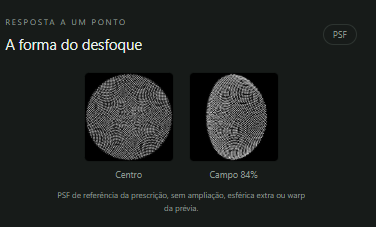
Off-axis, the beam is clipped by the front and rear glass. The disc becomes a cat's eye pointing to the center of the frame.

Front ≠ back

With spherical aberration, blur in front of and behind the focus plane differs: a bright ring on one side, a soft center on the other.

Color by wavelength

Each glass has its own index and dispersion. Red, green and blue focus at different places and create fringes on the disc edges.

Depth and occlusion

With RGB + depth, each plane gets the blur of its own distance and the foreground covers the discs behind it — with no halo of the subject's color.

02 — App renders

What changes inside the blur.

Real output from the simulator. Drag each divider.

Signed spherical aberration. Negative: a hard ring at the edge. Positive: a dense center and a fading edge. Same blur radius, two different textures — a blur filter has no way to know this.
Per-pupil-sample eclipse. An object between the light and the lens blocks only some of the rays. The disc becomes a soft-edged crescent — not a circle cut by a mask.
Drops on the front glass. Same lens, same image: focused at 0.6 m the drops show up as tiny lenses; focused at 5 m they dissolve, just like in a real camera.

03 — Live lab

Move the glass.

This is a lightweight version of the engine running in your browser. Drag a glass element to move it, the blue handles to change curvature and the orange ones to open or close the aperture. The bar under the lens focuses. The bokeh on the right is recomputed on every move.

Focal length—
Aperture—
Focus at—
RMS spot—
Edge light—
axial rays field rays curvature iris

Sensor 36 × 24 mm · background + foreground lights
Bokeh · center
Bokeh · edge
Bokeh · front
Spot at focus
Surface

Real 3D ray tracing (vector Snell, spherical surfaces, diameter clipping and polygonal iris) with Abbe-based dispersion at three wavelengths. Simplified for the web: no Fresnel, coatings, ghosts, diffraction or depth. The full app traces on Vulkan/CUDA with up to 1024 samples per pixel.

04 — The app

From glass to pixel.

Pick a lens, open an image, video or depth map and see the preview on the GPU. Edit the prescription, follow the light path and the blur shape at the center and across the field.
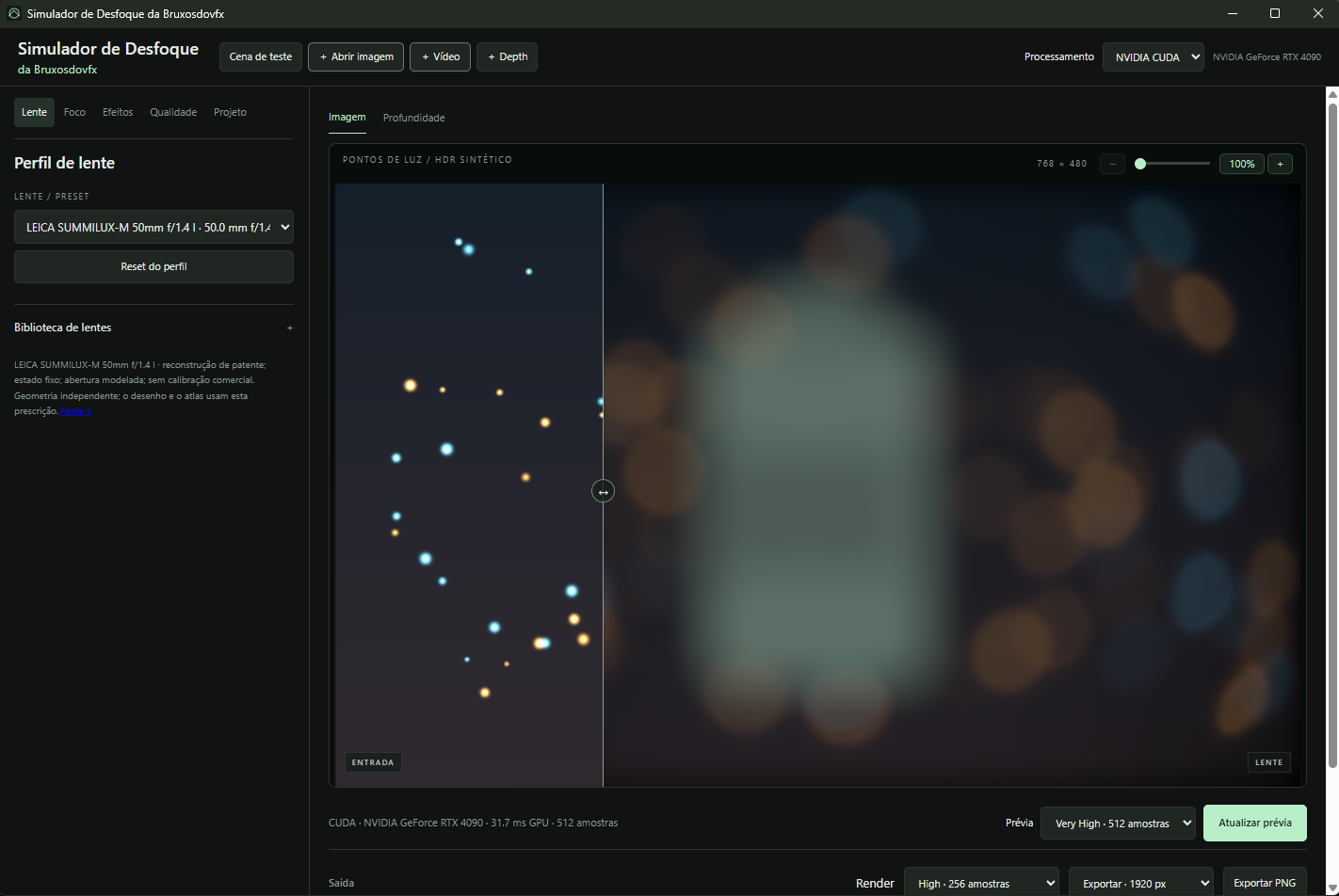
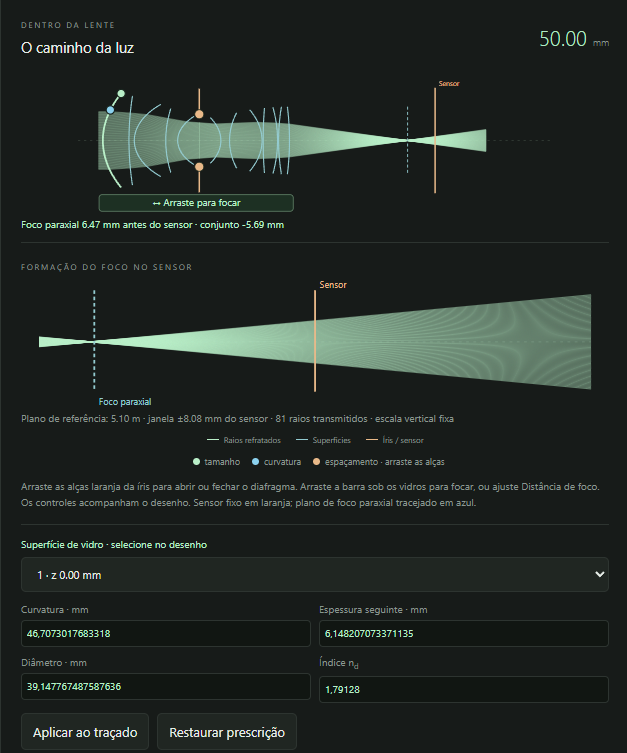
Lens Blur Simulator interface: sharp input on the left and optical bokeh output on the right 'Light path' panel with rays traced through the lens 'Blur shape' panel with the PSF at the center and in the field
Image, video and depthRGB + depth with per-channel coverage; exports PNG and frame-by-frame MP4.
Preview × renderQuality from Draft (24) to Extreme (1024 samples), with independent preview and render settings.
Coatings, ghosts and diffractionPer-interface AR coating, reflections between surfaces and diffraction stars oriented by the blades.
Editable prescriptionCurvature, thickness, diameter and index of every surface, with the drawing kept in sync.

05 — Library

0+ lenses
to choose from.

Double-Gauss, Sonnar, Tessar, Petzval, triplets, anamorphics and retrofocus. Each profile changes the optical model, focal length, glass size, maximum aperture and iris.

LensFocalAperture FamilyBladesCharacter

06 — Engine

Real rays, on the GPU.

0optical samples per pixel and channel in Extreme mode
0×faster than CPU when building the ray atlas in Vulkan (RTX 4090)
0%less edge jump in chromatic compositing with depth (v0.8.8)
0+automated tests for energy, focus, depth and GPU
1Prescriptionsurfaces, glass, aperture stop
2TracingSnell + Fresnel in Vulkan compute
3PSF atlasper field, channel and aperture
4CompositingRGB + depth in linear light
5Outputpreview, PNG, MP4, plugins

07 — Platforms

One lens, seven places.

The same optical engine and the same library in the app and the plugins.

Desktop appWindows x64 · GPU NVIDIA CUDA / VulkanInstall · v0.9.6.20
After EffectsNative effect · 16/32 bpcDownload .zip · v0.2.6 Language:PTEN中文
DaVinci ResolveOpenFX plugin · depth inputDownload .zip · v0.2.5 Language:PTEN中文
NukePlugin for node-based compositingDownload .zip · v0.2.6 Language:PTEN中文
PhotoshopFilter for photos and layersDownload .zip · v0.1.3 Language:PTEN中文
Blender newBruxos Physical Lens add-onDownload add-on · v0.1.1 Full package (.zip)
ComfyUI newBruxos WebGL nodes for ComfyUIDownload .zip · v0.1.0
↻ Plugin updates Depth fixes, lens panel and Photoshop interface updates. Download the package for your plugin and language from release V0.9.26. View updates
Coming soon

Upcoming integrations of the same optical engine:

  • Flame
  • Unreal Engine